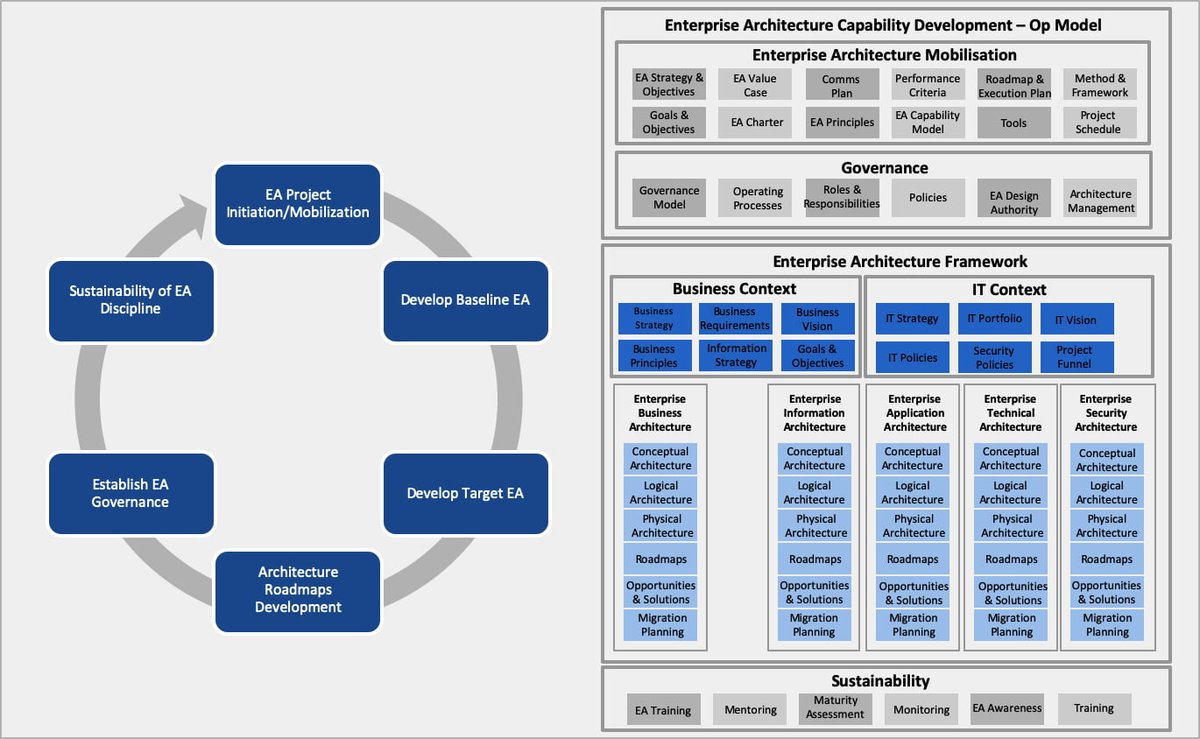
Modern enterprise IT landscapes are rarely simple. They're a sprawling web of interdependent systems, business processes, data flows, and strategic objectives. Without a clear, universally understood blueprint, navigating this complexity becomes an exercise in frustration, leading to misalignment, delays, and costly errors. This is precisely where UML for Enterprise Architecture & System Design steps in, offering a standardized visual language to bring order, clarity, and precision to even the most intricate organizational challenges.
Think of UML (Unified Modeling Language) not just as a tool for software developers, but as a robust communication framework for everyone involved in shaping your enterprise's digital future—from business analysts and solution architects to system engineers and project managers. It’s the visual vocabulary that allows diverse teams to speak the same language, ensuring everyone understands the "what," "how," and "why" of system development and architectural evolution.
At a Glance: What You'll Discover
- UML as Your Architectural Rosetta Stone: How a standardized visual language cuts through complexity and fosters understanding across your organization.
- Essential UML Diagrams for Architects: A practical look at the diagrams most valuable for enterprise architecture and system design, including Use Case, Activity, Class, Component, and Deployment diagrams.
- Beyond Basic UML: How robust tools extend UML to encompass requirements management, data modeling, code engineering, and project oversight.
- Bridging Business and Technical Realities: How UML connects strategic vision to detailed implementation, integrating frameworks like TOGAF and BPMN.
- Practical Steps for Implementation: Best practices, collaboration strategies, and automation insights to make UML work for you.
- Addressing Common Misconceptions: Dispelling myths about UML's complexity and utility in enterprise contexts.
The Unseen Blueprint: Why Enterprise Architecture Demands Clarity
In today's fast-paced business world, enterprise architecture (EA) is no longer a luxury; it's a strategic imperative. Organizations need to rapidly adapt, integrate new technologies, and ensure their IT infrastructure aligns perfectly with overarching business goals. The challenge? Communicating these intricate relationships effectively.
Without a common language, architectural visions can crumble under ambiguity. Business stakeholders speak in terms of value streams, IT operations in terms of servers, and developers in terms of classes and interfaces. This disconnect often leads to systems that are difficult to maintain, costly to integrate, and ultimately, fail to meet business needs. UML provides that missing link—a standardized set of notations that everyone can learn, interpret, and contribute to, transforming abstract ideas into concrete, actionable models.
UML: Your Universal Language for Enterprise Architecture
At its heart, UML is a graphical notation system for specifying, visualizing, constructing, and documenting the artifacts of a software-intensive system. But its power extends far beyond mere software; it's an incredibly versatile tool for modeling any system, process, or structure within an enterprise.
For enterprise architects, UML offers:
- Standardization: A globally recognized syntax ensures that a diagram created by one architect can be understood by another, regardless of their background or location.
- Clarity and Precision: Visual models eliminate the ambiguities inherent in natural language, forcing a precise definition of components, relationships, and behaviors.
- Collaboration: Provides a shared canvas for stakeholders to discuss, refine, and agree upon designs, fostering a common understanding and shared ownership.
- Analysis and Validation: Enables architects to identify potential issues, inconsistencies, or gaps in design early in the lifecycle, significantly reducing rework.
- Documentation: Creates living, visual documentation that is easier to maintain and understand than lengthy text documents, serving as a reliable source of truth.
By adopting UML, you’re not just drawing pictures; you're creating a verifiable, actionable model of your enterprise, empowering informed decision-making and streamlined development.
Charting the Course: Key UML Diagrams for Enterprise Architects
UML 2.5 offers 14 different diagram types, each serving a specific purpose. For enterprise architecture and system design, certain diagrams prove particularly invaluable for mapping out various facets of the enterprise.
Understanding Business Goals with Use Case Diagrams
Think of Use Case diagrams as the starting point for any system design. They visually represent the functional requirements of a system from an external perspective, focusing on what a system does for its users (actors), without detailing how it does it.
For Architects:
- Identify and define system boundaries.
- Understand core business processes and user interactions.
- Communicate high-level system functionality to non-technical stakeholders.
- Prioritize development efforts based on critical use cases.
Mapping Workflows with Activity Diagrams
Activity diagrams are essentially flowcharts on steroids. They illustrate the sequence of activities performed in a business process or within a system, including decisions, concurrent paths, and loops.
For Architects:
- Model end-to-end business processes, identifying bottlenecks and opportunities for optimization.
- Define the workflow logic for system components.
- Clarify complex operational sequences and their dependencies.
- Help bridge the gap between business process models (like BPMN) and system design.
Defining Structure with Class and Object Diagrams
These diagrams are fundamental for depicting the static structure of a system.
- Class Diagrams show the classes, their attributes, operations, and the relationships between them (e.g., inheritance, association, aggregation).
- Object Diagrams show instances of classes (objects) at a specific point in time, illustrating concrete data relationships.
For Architects: - Design the logical structure of software systems, databases, and data models.
- Understand data entities and their interconnections across the enterprise.
- Facilitate object-oriented design principles and reuse.
- Form the basis for code generation and database schema creation.
Assembling Systems with Component Diagrams
Component diagrams depict the structural relationships between software components, their interfaces, and how they are wired together. Components can be anything from a database, a web service, or an executable application.
For Architects:
- Model the architecture of large, distributed systems.
- Understand the dependencies and interfaces between different software modules.
- Plan for reusability and maintainability of software assets.
- Facilitate platform-independent design.
Placing Systems in Reality with Deployment Diagrams
Deployment diagrams visualize the physical deployment of artifacts on nodes (hardware and software execution environments). They show where components reside and how they interact in the real world.
For Architects:
- Map software components to physical hardware and network infrastructure.
- Plan for system scaling, redundancy, and network topology.
- Document the operational environment of an application.
- Crucial for infrastructure planning and DevOps considerations.
Illustrating Interaction with Sequence and Communication Diagrams
These diagrams model the dynamic behavior of a system, showing how objects interact over time to perform a specific function.
- Sequence Diagrams emphasize the time-ordered sequence of messages passed between objects.
- Communication Diagrams focus on the structural organization of objects and their interactions.
For Architects: - Detail the flow of control and data between objects during an operation.
- Identify potential concurrency issues or performance bottlenecks.
- Understand the choreography of complex distributed services.
- Trace the execution path of a user interaction through various system components.
Tools like Enterprise Architect (EA) provide a user-friendly and flexible environment for all these UML 2.5 diagrams, extending their utility with capabilities for SysML (Systems Modeling Language), BPMN (Business Process Model and Notation), and support for enterprise architecture frameworks like TOGAF and UPDM. This holistic approach ensures you have the right modeling tool for every architectural challenge.
Beyond Core UML: Integrating Essential EA Functions
While UML provides the bedrock, effective enterprise architecture and system design require more than just diagrams. A truly comprehensive approach integrates modeling with crucial lifecycle activities, and modern tools are built to facilitate this synergy.
Holistic Modeling for the Enterprise
Enterprise architects don't just model software; they model business processes, strategic capabilities, and the entire ecosystem. UML tools expand to support this broader scope:
- Connecting Business, Systems, and Operations: Integrated platforms allow you to create models that link high-level business goals (e.g., using BPMN) directly to underlying system components (UML) and even hardware (Deployment diagrams).
- Leveraging Open Standards: Beyond core UML, support for standards like SysML (for systems engineering), BPMN (for business process modeling), and frameworks like TOGAF and UPDM (for defense architectures) provides a versatile toolkit.
- Perspective-Based Modeling: Advanced tools let you focus on specific tasks, whether it's business analysis, strategy, software design, or systems engineering, by filtering out irrelevant details and presenting the most pertinent information. This helps manage complexity and keeps teams focused.
Requirements Traceability: The Golden Thread
One of the greatest challenges in large projects is ensuring that what was requested is what gets delivered. Integrated requirements management capabilities are critical.
- From High-Level Spec to Deployment: Tools allow you to track requirements from their initial high-level specifications through analysis, design, implementation, testing, and final deployment.
- Impact Analysis: A crucial capability for architects, enabling you to understand the ripple effect of a proposed change on related requirements, designs, and code. This is often achieved through relationship matrices and hierarchy views.
- Verification and Validation: By linking requirements directly to model elements, test cases, and source code, you can easily verify that all requirements have been addressed and validated.
Data Modeling and Database Design
Data is the lifeblood of any enterprise. UML provides a powerful way to model data structures, and specialized profiles extend this to database concepts.
- Extending UML for Databases: Data modeling profiles enhance UML to represent tables, relationships, keys, triggers, and constraints. This means your logical data model is directly integrated with your overall system design.
- DDL Generation: From these UML-based data models, robust tools can automatically generate Data Definition Language (DDL) scripts for a wide array of database management systems (e.g., InterBase, DB2, Informix, MySQL, MS Access, Ingres, Oracle, PostgreSQL, MS SQL Server, Firebird, Sybase ASE, ASA). This significantly reduces manual effort and potential errors.
From Design to Code: Bridging the Gap
UML isn't just about pretty pictures; it's about executable specifications. Modern tools bridge the gap between design and implementation.
- Code Generation: Generate source code directly from your UML models for languages like ActionScript, Ada, C/C++, C#, Visual Basic, PHP, Java, Python, Delphi, and VB.Net. Customizable templates ensure the generated code adheres to your specific coding standards.
- Reverse Engineering: Import existing frameworks and legacy systems from source code, JAR files, or .Net binary assemblies to visualize their structure as UML models. This is invaluable for understanding complex existing systems and planning migrations.
- Model Driven Architecture (MDA): This powerful approach allows you to develop abstract, platform-independent models (PIM) and then automatically transform them into detailed, platform-specific models (PSM) and even generate code. Tools offer built-in transformations for C#, DDL, EJB, Java, JUnit, NUnit, WSDL, and XSD, streamlining multi-platform development.
- Integrated Development Environment (IDE) Integration: Tight integration with popular IDEs like Eclipse and Visual Studio .NET means developers can work seamlessly between code and model. Need to visualize your code? Our UML diagram generator can help you quickly create diagrams from existing code.
Testing and Validation: Ensuring Quality
A well-designed system must also be a well-tested system. UML tools incorporate testing and debugging capabilities to ensure quality from the outset.
- Test Case Generation: Automatically generate NUnit/JUnit test classes directly from your models via MDA transformations.
- Integrated Debugging: Debuggers for Java, .NET, and Microsoft Native (C++, C, VB) allow you to capture stack trace information and even generate sequence diagrams from actual code execution, offering real-time insights into system behavior.
- Visual Execution Analysis: Manage test points, visualize execution paths, and analyze test results directly within your modeling environment.
Project Management Oversight
For project managers, UML models can provide crucial insights into project complexity, progress, and resource allocation.
- Effort and Complexity Estimation: Features like Use Case Metrics help assess project complexity and size, aiding in more accurate estimations.
- Resource Allocation: Allocate resources directly to model elements and tasks.
- Risk and Change Control: Integrate risk assessment and manage change control processes within the model.
- Gantt Charts: View integrated task and resource allocations as familiar Gantt charts, providing a clear timeline of project activities.
The Practice of UML in Enterprise Architecture: Best Practices & Tools
Implementing UML effectively in an enterprise context isn't just about knowing the diagrams; it's about leveraging the right tools and fostering a collaborative environment.
Choosing the Right Tools
While whiteboard sketches are a good start, robust, multi-user modeling tools are essential for enterprise-scale projects. When evaluating a tool, consider:
- Comprehensive Standard Support: Does it support all UML 2.5 diagrams, plus relevant extensions like SysML, BPMN, and enterprise frameworks?
- Performance: Can it handle extremely large models (millions of elements) and load them quickly?
- Multi-User & Collaboration Features: Is it designed for teams, with integrated version control, secure access, and support for globally distributed collaboration? A high-performance model repository is key.
- Lifecycle Integration: Does it offer capabilities for requirements, data modeling, code engineering, testing, and project management, as discussed above?
- Documentation & Reporting: Can it generate high-quality, customizable documentation in various formats (WYSIWYG editor, HTML)?
- Automation: Does it provide an API or scripting interface to automate recurring tasks?
Many organizations find tools like Enterprise Architect (EA) to be an ideal fit, offering a 30-day limited trial version to explore its capabilities firsthand.
Version Control and Collaborative Modeling
In a large enterprise, an architectural model is a living document, constantly evolving. Effective version control and collaboration mechanisms are paramount.
- Integrated Version Control: Your modeling tool should offer robust version control capabilities, allowing teams to track changes, revert to previous versions, and manage parallel development.
- Secure Access for Distributed Teams: Solutions like the Pro Cloud Server enable secure access for remote team members and stakeholders, facilitating real-time collaboration regardless of geographic location. This ensures everyone is working from the same source of truth.
Managing Complexity with Visuals
Complexity is the natural enemy of clarity. UML tools provide features specifically designed to help architects tame it.
- Layered Diagrams: Create strategic and business-level diagrams that abstract details, then drill down into domain-specific models.
- Profiles and Patterns: Utilize domain-specific profiles and over 1000 reusable patterns to accelerate modeling and ensure consistency.
- Baseline Management: Regularly baseline your models to track changes and compare different architectural states over time.
- Role-Based Security: Control who can view, edit, or approve different parts of the model, maintaining integrity and governance.
Automating Repetitive Tasks
Architects often perform repetitive tasks, from generating documentation to querying specific model elements. Automation can free up valuable time.
- Scripting Interface: A powerful automation interface (e.g., via ActiveX COM clients) allows you to script recurring tasks, generate code from state machines or diagrams, create customized reports, and execute ad-hoc queries. This makes the modeling environment highly extensible and adaptable to your specific needs.
Common Questions and Misconceptions About UML in EA
Even with its widespread adoption, UML often faces skepticism, particularly in larger enterprise contexts. Let's address some common points of confusion.
"Isn't UML just for software developers?"
Misconception: Many perceive UML as solely a coding blueprint, irrelevant to business strategists or infrastructure planners.
Reality: While UML is crucial for software development, its core strength is visualizing any system. For enterprise architects, this includes business processes (Activity Diagrams), organizational structures (Class Diagrams for roles/departments), strategic capabilities, data flows, and physical deployments (Deployment Diagrams). It’s a language for holistic system understanding, not just lines of code.
"Is UML too complex and cumbersome for agile enterprises?"
Misconception: Some believe UML adds unnecessary overhead, slowing down agile development cycles.
Reality: Used correctly, UML simplifies complexity, especially in agile environments. You don't need to create every diagram for every detail. Agile teams can use lightweight UML sketches for rapid communication, design discussions, and quick documentation, focusing on just enough modeling to facilitate understanding and reduce risk. Tools with rapid modeling features further streamline the process. The initial investment in modeling pays dividends by catching errors early, reducing rework, and improving long-term maintainability—all of which are agile goals.
"Does UML limit creativity or innovation?"
Misconception: The structured nature of UML is sometimes seen as stifling design freedom.
Reality: On the contrary, by clearly defining the problem space and existing constraints, UML frees architects to innovate within those boundaries. It provides a common ground for discussing radical new approaches and evaluating their implications rigorously before committing to development. It's like having a precise musical notation: it doesn't limit creativity, it provides the structure to express it effectively.
"My existing systems are too old/complex to model with UML."
Misconception: The belief that legacy systems are too messy to fit into a structured UML model.
Reality: This is precisely where UML, especially with reverse engineering capabilities, becomes invaluable. By importing source code, database schemas, or API definitions, tools can generate UML models of existing systems. This process provides much-needed clarity on legacy components, aiding in modernization efforts, migration planning, and understanding dependencies that might otherwise remain opaque.
Empowering Your Architecture: Next Steps
Leveraging UML for Enterprise Architecture & System Design is a journey towards greater clarity, efficiency, and alignment within your organization. It's not just about drawing diagrams; it's about fostering a culture of precise communication and holistic system understanding.
To truly harness the power of UML, consider these actionable steps:
- Start Small, Think Big: Begin by applying UML to a manageable, high-impact project. Focus on the diagrams most relevant to your immediate challenge, then gradually expand your usage.
- Invest in the Right Tools: A robust modeling platform is crucial. Explore comprehensive solutions that integrate UML with requirements management, code engineering, and collaboration features. Don't hesitate to take advantage of trial versions to see which tool best fits your team's workflow.
- Prioritize Training: Ensure your team—from business analysts to system engineers—has access to quality training. A foundational eLearning course, such as 'Start Modelling with Enterprise Architect', can quickly bring everyone up to speed.
- Foster Collaboration: Encourage all stakeholders to engage with the models. Make them accessible, facilitate review sessions, and use them as a central point for discussion and decision-making.
- Embrace the Sparx Platform Vision: Understand how platforms designed around Model-Based Systems Engineering (MBSE) and application portfolio management (APM) can empower executives, architects, and delivery teams to align strategy with execution, driving innovation and ensuring end-to-end traceability.
By embracing UML as a strategic asset, you empower your enterprise to navigate complexity with confidence, accelerate innovation, and build resilient, future-ready IT systems that truly support your business objectives.