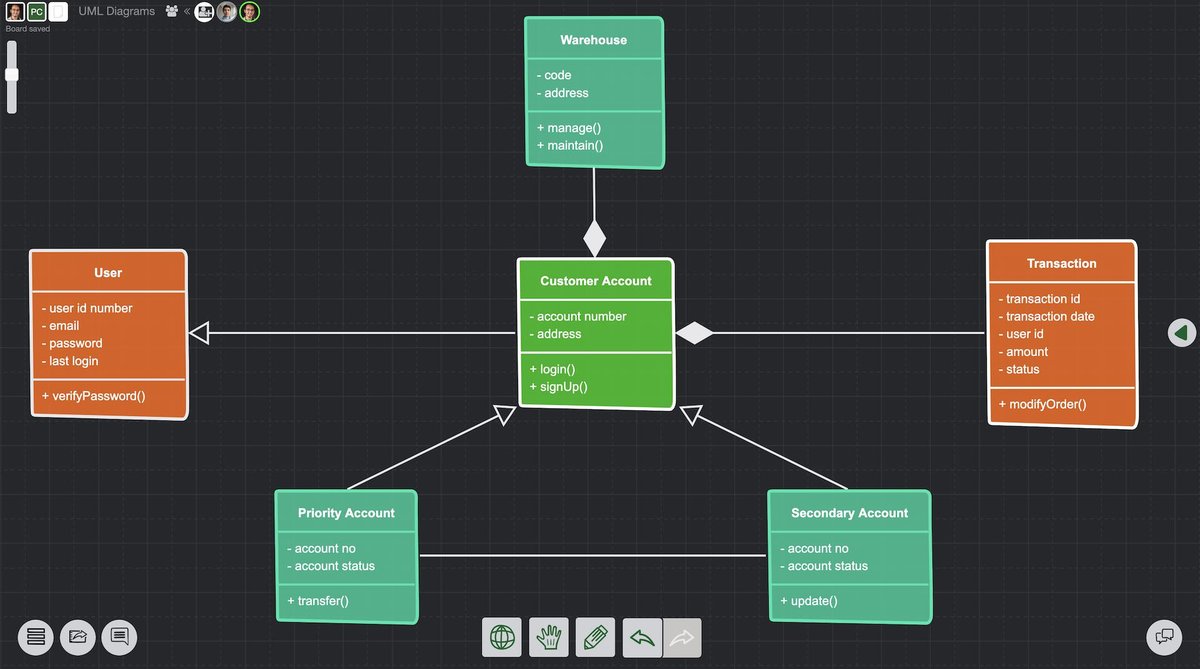
Creating effective UML diagrams isn't just about drawing boxes and lines; it's about communicating complex ideas with crystal clarity. Yet, far too often, what starts as an effort to simplify ends up as a tangled web, causing more confusion than insight. If you've ever stared at a diagram feeling a mix of frustration and bewilderment, you're not alone. This guide dives deep into Troubleshooting & Optimizing UML Diagramming, ensuring your visual models serve their true purpose: enhancing understanding and driving better software development.
At a Glance: Crafting UML Diagrams That Speak Volumes
- Consistency is Key: Standardize everything from colors and fonts to symbols and layout for immediate recognition.
- Less is More: Strip away non-essential details. Focus on the core message of each diagram.
- Embrace White Space: Give your elements room to breathe. Proper spacing and alignment make diagrams scannable.
- Group and Abstract: Use containers and hierarchical structures to manage complexity, revealing detail on demand.
- Know Your Audience & Purpose: Tailor each diagram to its specific goal and the stakeholders who will consume it.
- Iterate and Refine: Diagrams are living documents. Continuously review and improve them for clarity.
Why UML Matters (and Where It Often Goes Wrong)
The Unified Modeling Language (UML) stands as a cornerstone for software architects, developers, and business analysts alike. It's a standard visual language, meticulously crafted by the "Three Amigos" – Grady Booch, Ivar Jacobson, and Jim Rumbaugh – and stewarded by the Object Management Group (OMG). With its current iteration, UML 2.5, released in June 2015, it provides a powerful toolkit for describing, specifying, designing, and documenting everything from business processes to the intricate structure and behavior of software systems.
Whether you're outlining a banking system or designing healthcare applications, UML offers a common tongue. It's a modeling language, remember, not a prescriptive development process. This distinction is crucial: UML provides the vocabulary; you supply the narrative within your chosen iterative and incremental development process, like the Rational Unified Process (RUP).
However, despite its power, UML is not a magic bullet. Diagrams can quickly become visual noise, leading to misinterpretation, errors, and wasted effort. Information might be intentionally omitted, interpretations can vary, and some concepts even lack explicit graphical notation. That's where troubleshooting and optimization come in. The goal isn't just to create a diagram, but to craft one that truly communicates.
The Hidden Pitfalls: Why UML Diagrams Go Awry
Before we optimize, let's diagnose. What usually sends a UML diagram into the "confusing mess" category?
Overloaded with Detail
One of the most common traps is trying to cram every single piece of information into a single diagram. You end up with a sprawling canvas where lines cross in a spaghetti-like tangle, text overflows, and no single element stands out. The diagram becomes an information dump rather than a focused communication tool.
Inconsistent Visual Language
Imagine reading a book where every chapter uses a different font, color scheme, and margin width. Frustrating, right? UML diagrams suffer similarly when formatting is inconsistent. Different symbols for the same type of element, varying line styles, or arbitrary color choices create visual dissonance, forcing the reader to constantly re-interpret the diagram's grammar.
Poor Layout and Spatial Management
Elements crammed together without breathing room, or, conversely, scattered too widely without logical grouping, instantly diminish readability. A lack of alignment makes a diagram look sloppy and unprofessional, signaling a lack of care in its creation and, by extension, in the underlying system it represents.
Ambiguous Relationships and Labels
Arrows pointing in unclear directions, labels that are vague or overly technical, or missing multiplicity notations can render relationships meaningless. If the connection between two elements isn't immediately obvious and precise, the diagram fails to convey critical structural or behavioral information.
Forgetting the "Why": Lack of Purpose
Every diagram should have a clear reason for existing. Is it to show user interactions (optimizing Use Case Diagrams is key here)? To illustrate a process flow (understanding Activity Diagrams might be your best bet)? Or to detail class structure (designing Class Diagrams effectively becomes paramount)? A diagram without a defined purpose often ends up trying to do too much, and thus accomplishes very little.
Pillars of Optimization: Crafting Clear and Readable Diagrams
Optimization isn't about cosmetic touches; it's about strategic choices that enhance understanding. These core principles, outlined by the Object Management Group's guidance on UML, form the bedrock of effective diagramming.
Consistency is King: A Unified Look and Feel
This is perhaps the most fundamental rule. Your diagrams should be instantly recognizable and easy to scan because their visual grammar remains constant.
- Standardized Layout: Decide on a consistent direction for flow (e.g., left-to-right or top-to-bottom for sequences) and stick to it across similar diagram types.
- Color Schemes with Purpose: Don't use colors arbitrarily. Assign specific meanings to colors (e.g., green for external systems, blue for core components, red for error states). Use a limited palette.
- Font Styles and Sizes: Standardize fonts for labels, notes, and element names. Ensure they're readable at various zoom levels. Reserve larger fonts for primary headings or key elements.
- Symbol Uniformity: Always use the same symbol for the same type of element. If a package is a rectangle with a tab, it should always be that. This avoids cognitive load as readers interpret the diagram.
Decluttering Your Canvas: Simplicity Through Abstraction
Overloading a diagram is a surefire way to obscure its message. Think of your diagram as a story; only include the details necessary for this specific chapter.
- Focus on Essential Information: Before adding an element or attribute, ask yourself: "Does this contribute directly to the diagram's primary message?" If not, leave it out.
- Group Related Elements: Use containers like packages, subsystems, or components to visually cluster related elements. This helps readers grasp high-level structures before diving into specifics.
- Utilize Layers and Abstraction: For complex systems, create multiple diagrams at different levels of abstraction. A high-level component diagram might show major system parts, while a lower-level class diagram reveals the internal structure of one component. This allows you to explore details without overwhelming the initial view. For instance, exploring Component Diagrams can show macro-level architecture, while specific class diagrams elaborate on individual components.
- Hide Non-Critical Details: Many modern UML tools allow you to collapse attributes or operations on classes, or even hide entire sections, revealing them only when needed.
The Power of Space: Layout and Alignment
Just like well-designed typography uses leading and kerning to improve readability, effective UML diagramming leverages white space and alignment.
- Adequate White Space: Don't cram elements together. Provide sufficient padding between shapes, text, and lines. White space guides the eye and prevents visual fatigue.
- Align Elements: Use your diagramming tool's alignment features (horizontal, vertical, distribution) religiously. A grid system can be invaluable here. Aligned elements create a sense of order, making the diagram feel professional and easier to process.
- Minimize Line Crossings: Where possible, arrange elements to reduce the number of crossing lines. This often requires some iterative adjustment, but the payoff in clarity is immense.
- Route Lines Intelligently: Avoid overly long, circuitous lines. Straight lines or lines with minimal bends are generally easier to follow.
Leveraging the Right Tools for the Job
While the principles remain constant, modern tools can significantly aid your optimization efforts. Many robust UML diagram generators offer features like automatic layout, style templating, and consistency checkers, making it easier to adhere to best practices. They empower you to focus on the modeling itself, rather than the minutiae of drawing.
Troubleshooting Common UML Diagram Headaches
Even with best practices in mind, diagrams can go astray. Here's how to tackle some common problems head-on.
Problem: Overwhelmed by Detail? The "Less is More" Approach
Symptom: Your diagram is a giant blob of interconnected shapes; nothing stands out.
Solution:
- Identify the Primary Message: What single thing should a viewer understand from this diagram? Ruthlessly remove anything that doesn't directly support that message.
- Break It Down: If a diagram is too complex, it's likely trying to do too much. Split it into two or more focused diagrams. For example, separate structural concerns from behavioral ones.
- Use Abstraction: Replace detailed elements with higher-level abstractions. Instead of showing every single class in a subsystem, show the subsystem as a single component, then link to another diagram for its internal structure.
- Hide Internal Details: If you're showing a component, only expose its public interfaces. Keep its internal classes and methods hidden unless the diagram's purpose is to explain those internals.
Problem: Confusion Over Relationships? Clarify Connections
Symptom: Readers can't tell what connects to what, or why. Arrows are everywhere.
Solution:
- Clear Directionality: Ensure arrows clearly indicate the direction of dependency, data flow, or message passing.
- Explicit Labels: Add brief, descriptive labels to association lines (e.g., "manages," "performs," "notifies"). Avoid generic labels like "uses."
- Multiplicity Matters: Always include multiplicity notations (e.g.,
1,0..*,1..*) on associations. This provides crucial semantic information about how many instances of one element relate to another. - Avoid Crossing Lines: Reroute lines to minimize intersections. This might mean adjusting the positions of elements slightly. When crossings are unavoidable, use a "bridge" or "jump" notation if your tool supports it, or simply ensure lines are clearly distinct.
Problem: Inconsistent Notation? Standardize Your Language
Symptom: Different parts of your diagram, or different diagrams within a project, use varying symbols or styles for the same concept.
Solution:
- Reference the Standard: Familiarize yourself with UML 2.5 notation. While some flexibility exists, sticking to the standard significantly improves universality.
- Team Guidelines: Establish a style guide for your team. Document preferred colors, fonts, line styles, and layout conventions.
- Utilize Templates: Create templates in your diagramming tool that enforce consistent styles. This makes it easier for everyone to adhere to the agreed-upon standards.
- Review and Refactor: Regularly review diagrams created by the team to identify and correct inconsistencies. This is especially true when diagnosing issues in Sequence Diagrams where timing and message order are critical.
Problem: Diagrams That Don't Tell a Story? Focus on the Narrative
Symptom: The diagram is technically correct but doesn't convey useful insights or answer a specific question.
Solution:
- Define the Goal First: Before drawing, write down: "The purpose of this diagram is to show..." This clarifies your intent.
- Identify the Audience: Who will read this? A business stakeholder needs a different level of detail than a developer.
- Highlight Key Elements: Use visual emphasis (e.g., bolder lines, slightly different color, strategic placement) to draw attention to the most important parts of the diagram.
- Add Explanatory Notes: Use UML's note facility to provide additional context, explain ambiguities, or highlight assumptions. These are invaluable for clarity, particularly when a concept might lack direct graphical notation within UML itself.
Advanced Optimization Techniques for UML Pros
Once you've mastered the basics, consider these techniques to elevate your UML game even further.
Layering and Viewpoints: Managing Grand Complexity
For truly large and complex systems, a single set of diagrams won't suffice. You need to present different "views" to different stakeholders.
- Architectural Layers: Create diagrams that represent different architectural layers (e.g., presentation, business logic, data access). This provides a structured overview.
- Stakeholder-Specific Views: A business analyst might need a Use Case diagram focused purely on functionality, while a database designer needs a Class diagram with detailed attributes and relationships. A DevOps engineer, however, might benefit most from a Deployment diagram.
- Refinement with Traceability: Link high-level elements to more detailed diagrams. For example, a component in an architecture diagram could link to a detailed class diagram of its internal structure.
Tooling Up for Success: Beyond the Basics
Your choice of UML tool can significantly impact your efficiency and the quality of your diagrams.
- Smart Layout Algorithms: Look for tools that offer automatic or semi-automatic layout features. While not perfect, they can give you a great starting point for alignment and spacing.
- Templating and Style Management: Tools that allow you to define and apply consistent styles across all your diagrams are invaluable for enforcing consistency.
- Version Control Integration: Treat your diagrams as code. Store them in version control systems to track changes, revert to previous versions, and collaborate effectively.
- Model Validation: Some advanced tools can check your diagrams against UML rules, helping catch errors early.
Beyond Notation: Semantic Precision
UML is a language, and like any language, precise semantics are critical. While UML provides notation for many concepts, some aspects might require clarification or supplementary documentation. For example, the precise semantics of multiplicity on use case diagrams are not always graphically explicit.
- Define Domain Terms: Create a glossary of terms specific to your project or domain. This ensures everyone understands the meaning behind the labels in your diagrams.
- Supplementary Documentation: Use accompanying text, explanations, or even a small README file for each diagram set. This can clarify areas where graphical notation might be limited or open to interpretation. When designing Class Diagrams effectively, detailed attribute definitions are often best kept in accompanying documentation.
Quick Checks Before Sharing: Your Pre-Flight Checklist
Before you present your masterpiece, give it a quick once-over. This brief checklist can save you from common embarrassment and confusion.
- The Blink Test: Can someone grasp the diagram's main point within 5 seconds? If not, it's probably too complex or poorly laid out.
- The Label Test: Is every element, relationship, and note clearly and unambiguously labeled? Are acronyms explained?
- The Alignment Test: Does everything look tidy and aligned? Are there obvious gaps or cramped sections? Run an auto-layout if available, then fine-tune.
- The Purpose Test: Does the diagram achieve the specific goal you set out for it? Does it answer the question it's supposed to answer? For instance, does this understanding Activity Diagrams accurately represent the intended process flow?
- The Redundancy Check: Is there any information duplicated across diagrams or within the same diagram unnecessarily?
- The Consistency Check: Are all visual elements (colors, fonts, symbols) consistent with your team's guidelines and UML standards?
Putting It All Together: Your Path to Masterful UML Diagrams
Mastering UML diagramming isn't a one-time achievement; it's a continuous journey of refinement. By actively troubleshooting common pitfalls and embracing optimization best practices, you move beyond merely drawing shapes to truly communicating complex system designs. Remember, the most valuable diagram isn't the most beautiful or the most detailed, but the one that most effectively conveys its intended message to its audience. So, take these principles, apply them diligently, and watch your diagrams transform from confusing scribbles into powerful tools for understanding and collaboration. Iterative improvement, much like in software development itself, is the key to creating UML diagrams that truly shine.